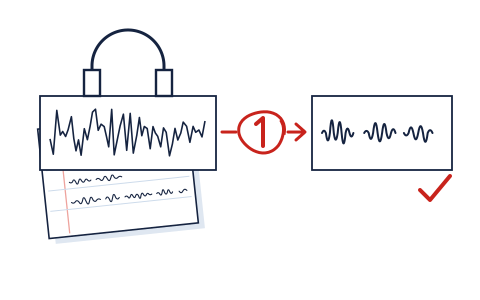
An enhanced voice turns robotic when the tool removes, replaces or invents more than the recording can spare. The fix is almost never a different enhancer. It's naming the artifact you're hearing, finding the one control that governs it, and turning that control down until the voice sounds like a person again. Some tools give you that control; some give you nothing to turn, and that difference is a large part of how we grade them.
Full guide: The graded ranking of AI voice enhancers
The five artifacts, by ear
Listen on headphones, at normal volume, to a passage with quiet speech, a few "s" sounds and a pause. Most robotic results fall into one of five shapes.
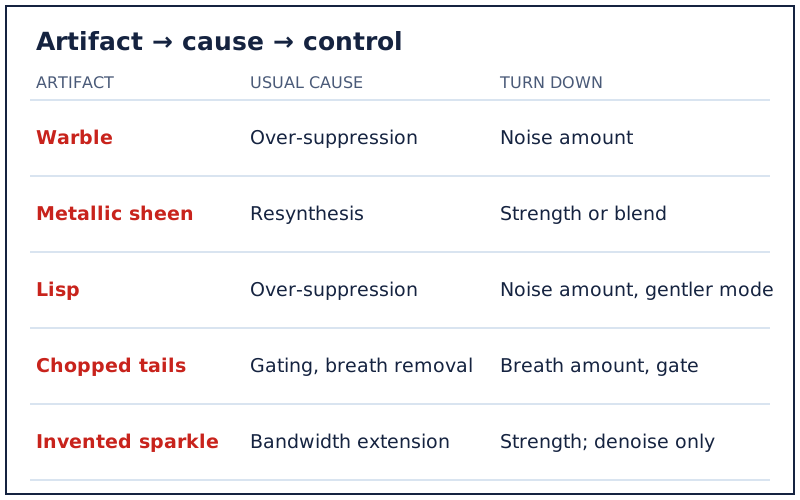
- Warble. A watery, underwater flutter on vowels, as if the voice were passing through a fish tank. Usually suppression working too hard on a voice that sits close to the noise.
- Metallic sheen. A hard, buzzy, slightly synthetic tone across everything, the classic "robot." Often the sign of a tool rebuilding speech rather than cleaning it, and pushed past what the source supports.
- Lisp. "S" and "f" sounds smeared, softened or missing. High-frequency consonants look like noise to an aggressive model, so they go first.
- Chopped tails. Word endings and breaths cut off abruptly, leaving dead silence between phrases. Gating and breath removal set too high.
- Invented sparkle. A brightness or texture that wasn't in the room, sometimes a faint hiss of fake air. Tools that extend bandwidth guess at missing detail, and on a poor source the guess can be wrong.
Hearing two at once is common. Fix the loudest one first; the others often recede with it.
Why enhancers create them
Three mechanisms account for nearly all of it. Over-suppression: the model removes what it judges to be noise, and when voice and noise overlap in time and frequency, some voice goes too; warble, lisp and chopped tails follow. Resynthesis: some tools don't just subtract, they regenerate speech from what they can identify, which is how a muddy file can come back crisp, and also how it can come back metallic. Bandwidth extension: restoration models such as Resemble Enhance, whose README says its enhancer restores distortions and extends audio bandwidth, fill in high frequencies a poor recording never captured; when the guess misses, you hear invented sparkle. None of this is a defect in a single product. It is what the category does when asked for more than the recording contains, which is also why we call out "studio quality" claims in our grade-inflation note.
Per tool: where the strength or blend control is
This is the practical half of the page. Controls named as each vendor names them, read on 18 Oct 2026 unless a review date is given.
| Tool | Control that backs off | What to try first |
|---|---|---|
| Auphonic | Separate Remove Noise, Remove Reverb and Remove Breaths amounts; four denoise methods | Lower Remove Noise; switch Speech Isolation to Dynamic or Static Denoiser |
| iZotope RX 12 | Per-module parameters, including Dialogue Isolate in offline and real-time modes | Ease the module's settings back; process only the noisy section |
| LALAL.AI Voice Cleaner | Noise Canceling Level setting | Lower the level; LALAL.AI says higher levels can affect the voice's natural quality |
| Waves Clarity Vx | One knob for the vocal-to-noise balance; three neural networks (Broad 1, Broad 2, Broad ECO) | Turn the knob back; try Broad 1 if a second voice is being removed |
| Riverside Magic Audio | Per-track intensity from 0% to 100%, and Revert to original | Drop the noisy speaker's track to around half and listen |
| Resemble Enhance | Prior temperature, function evaluations, denoise-only mode | Use denoise only, or lower the temperature |
| ElevenLabs Voice Isolator | None described on its page | Process only the worst passage, or choose a tool with a dial |
| Async Magic Dust | On or off (our review, 2026-09-20) | Keep the original and compare; skip it on clean speech |
Adobe's Enhance Speech, which we don't grade, now lists adjustable speech, music and ambience among its features on its own page; if you use it, the same principle applies: bring the processed voice down until it stops sounding manufactured. For the graded field, see the full reviews of Auphonic, iZotope RX, LALAL.AI, Clarity Vx, Voice Isolator and Magic Dust.
Back off in this order
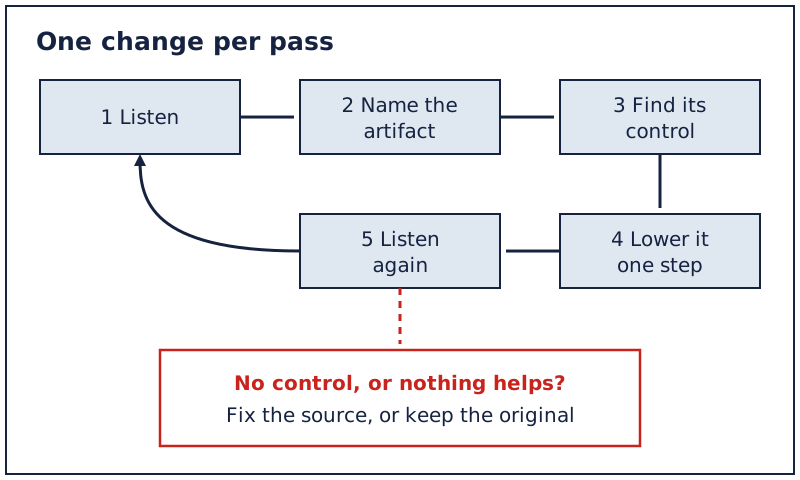
- Lower strength before anything else. A blend at 50 to 70 percent often keeps most of the cleanup and almost none of the robot. Where a tool has separate amounts, lower the noise amount first and the reverb amount second.
- Switch the mode, not the tool. Isolation modes that remove everything but speech are harsher than ones that keep music and ambience. A gentler mode on the same tool is usually better than a different tool at full force.
- Process less of the file. If only one minute has a leaf blower in it, enhance that minute and leave the rest alone.
- Accept a little noise. Listeners forgive steady room tone far more readily than a voice that sounds synthetic. Our recording workflow puts it as choosing the mildest pass that fixes the specific problem you named.
Fix the source first: three recording changes
Every artifact above gets worse as the voice gets quieter relative to the noise, so the cheapest cure happens before recording. Bring the mic closer: halving the distance raises the voice a great deal while the room stays put. Set the input level so speech is healthy without hitting the top, because a faint voice forces any enhancer to dig harder. And remove the loudest steady noise you control, a fan or an air purifier, before pressing record. Three free changes, and the enhancer has far less to guess.
Edge cases that make the robot worse
- Two enhancers in a row. Running a file through one tool and then another stacks their artifacts; the second model treats the first one's warble as signal. If one pass isn't enough, go back to the original and try a stronger setting on a single tool instead.
- A phone recording or voice message. These are often heavily compressed before you ever touch them, so there's less real detail to work with and more for a restoration model to invent. Use the lowest setting that helps and expect a smaller improvement.
- Two people on one track. Some models favour the louder voice and thin out the quieter one. Waves documents a network, Broad 1, meant to keep background voices; elsewhere, split the speakers onto separate tracks if you can.
- Music under the speech. Isolation modes treat music as something to remove, and the voice can come back hollow where the two overlapped. Auphonic's documentation points to its Static Denoiser for recordings that keep music in the mix.
- Real-time plugins during recording. A denoiser running live bakes its artifacts into the take. Record clean and process afterwards, when you can still undo it.
When to decline processing altogether
- The voice is already intelligible and the noise is mild. Enhancement then trades a small flaw for a new one.
- The character is the content. Breathy narration, singing, or a quiet confessional interview can lose exactly what made it work.
- Only one tool is available and it has no dial. If the result sounds robotic and there's nothing to turn down, the honest choice is the original file.
Want a tool you can turn down?
LALAL.AI's Voice Cleaner now has a Noise Canceling Level setting and offers 10 free preview minutes (vendor page, read 2026-10-18), enough to hear whether a lower level fixes your robot.
Questions
Why does my voice sound robotic after AI enhancement?
The tool removed or rebuilt more than the recording could spare. Over-suppression causes warble and lisping, resynthesis causes a metallic tone, and bandwidth extension can add invented brightness. Lower the strength or blend first.
How do I make an enhanced voice sound natural again?
Turn the strength or blend down one step at a time, switch to a gentler mode, and process only the noisy part. Keep the original so you can compare. A little leftover noise sounds more natural than a synthetic voice.
Which enhancers let you control strength?
From our checks on 18 Oct 2026: Auphonic, iZotope RX, LALAL.AI, Waves Clarity Vx and Riverside's Magic Audio offer a strength, level or blend control. ElevenLabs' Voice Isolator describes none, and our review of Async's Magic Dust found it on or off.
Why do my "s" sounds disappear after noise removal?
Sibilants are high-frequency and noise-like, so aggressive models remove them along with hiss. Lower the noise amount or choose a mode that keeps more of the signal, and get the mic closer next time.
Is it better to re-record than to enhance?
When you can, yes. A closer mic and a quieter room beat any enhancer. When you can't, process gently and accept a little noise rather than a robotic voice.
See the grades behind this page: best AI voice enhancer 2026 · how we grade.